


Introduction
Most organizations using SAP have more data than they know what to do with. The real problem is not data volume – it’s data accessibility.
Traditional reporting forces users to leave their ERP system, export files, and wait for IT to run reports. By the time a decision-maker sees the numbers, they’re already outdated. Finance teams are reconciling yesterday’s figures. Procurement managers are reacting to supplier issues that happened last week. Plant managers are reading production reports that are 12 hours old.
SAP S/4HANA Embedded Analytics was built to solve exactly this problem – putting live, real-time business intelligence directly inside the system where work actually happens.
What is Embedded Analytics in SAP S/4HANA?
Embedded Analytics in SAP S/4HANA refers to the native business intelligence and reporting capabilities built directly into the SAP S/4HANA platform. Unlike standalone BI tools that pull data from separate data warehouses, embedded analytics runs inside the transactional system – meaning users get live, real-time data without any lag, extraction, or reconciliation.
At its core, SAP S/4HANA Embedded Analytics is powered by the SAP HANA in-memory database, which processes both transactional (OLTP) and analytical (OLAP) workloads on the same data, in the same system, at the same time. This is known as the Dual-Use Engine or Mixed Workload capability – and it is what fundamentally separates S/4HANA analytics from legacy SAP ECC reporting.
The analytics layer is delivered through:
- SAP Fiori Analytical Apps – role-based, real-time dashboards embedded directly in the SAP Launchpad
- SAP Analytics Cloud (SAC) – for advanced planning, predictive analytics, and storytelling
- CDS Views (Core Data Services) – reusable virtual data models that power reports and apps
- ABAP for HANA – performance-optimized query execution at the database layer
- SAP Lumira and BusinessObjects – enterprise reporting and ad-hoc analysis
Key numbers to know:
- 10× faster report execution vs. SAP ECC
- 0 data replication needed for live reports
- 1,500+ pre-built Fiori analytical apps available in S/4HANA
- Real-time operational and financial insights across all modules
Why Embedded Analytics Matters in 2025
Business agility now depends on decision speed. In a post-pandemic, AI-first enterprise landscape, waiting 24 hours for a financial close report or three days for a supply chain exception report is simply not competitive. SAP S/4HANA Embedded Analytics is no longer a “nice-to-have” – it is a strategic business enabler.
Here is why organizations are prioritizing embedded analytics during their S/4HANA migrations and greenfield implementations:
Eliminating the Data Latency Problem
In SAP ECC environments, reporting typically required BW (Business Warehouse) extractions that ran nightly or weekly. Decision-makers were always looking at yesterday’s data. With embedded analytics in S/4HANA, reports reflect the current state of the business – every transaction, every inventory movement, every revenue posting is immediately visible.
Reducing the Analytics Stack Complexity
Many organizations have invested in multiple overlapping BI tools – SAP BW, BusinessObjects, third-party dashboards, and Excel sheets. SAP S/4HANA Embedded Analytics consolidates this stack. For standard operational and financial reporting, the need for a separate BW layer is significantly reduced or eliminated entirely.
Empowering Business Users, Not Just IT
Embedded analytics surfaces insights inside role-specific SAP Fiori apps. A finance controller, a procurement officer, and a plant manager each see their relevant KPIs on their personalized Fiori launchpad – without needing to run a transaction code or request a custom report from IT.
Key Features and Capabilities of SAP S/4HANA Embedded Analytics
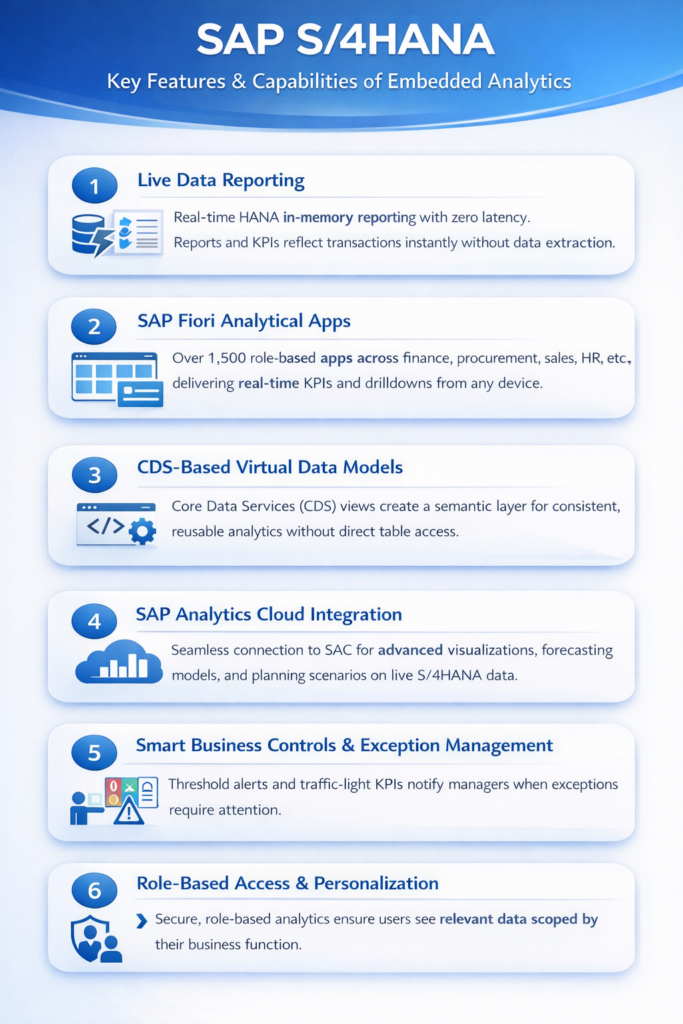
1. Live Data Reporting
Reports execute directly on HANA in-memory data with no data extraction or BW staging required. Zero latency from transaction to insight. When a goods receipt is posted, inventory reports update instantly. When a payment is cleared, the cash position reflects it immediately.
2. SAP Fiori Analytical Apps
Over 1,500 pre-built apps for finance, procurement, sales, HR, and supply chain – all delivering real-time KPIs and drilldown capability. These apps are responsive, role-based, and accessible from any device including mobile.
3. CDS-Based Virtual Data Models
Core Data Services (CDS) views create a semantic layer on top of S/4HANA tables – reusable, consistent, and query-optimized for analytics workloads. CDS views are the foundation of all embedded analytics in S/4HANA and ensure that custom reports remain upgrade-stable.
4. SAP Analytics Cloud Integration
A seamless live data connection to SAC enables advanced visualizations, forecasting models, and planning scenarios on top of real-time S/4HANA data – without any data replication or ETL pipeline.
5. Smart Business Controls & Exception Management
Exception-based management with threshold alerts and traffic-light indicators notify managers when KPIs deviate from targets. Instead of reviewing every line item, managers focus only on exceptions that require action.
6. Role-Based Access and Personalization
Analytics are scoped by role, org unit, and authorization object. Each user sees only the data and KPIs relevant to their business function – ensuring both data security and a clean, uncluttered user experience.
Embedded Analytics vs. Traditional SAP BI: A Clear Comparison
Organizations moving from SAP ECC to S/4HANA often ask whether they still need SAP BW or BusinessObjects. The answer depends on the use case – but for operational reporting, embedded analytics in S/4HANA is the clear winner.
| Capability | SAP S/4HANA Embedded Analytics | Traditional SAP BW / BI |
| Data Freshness | Real-time / live | Batch / nightly load |
| Data Replication Required | No – direct HANA access | Yes – ETL pipelines required |
| Setup Complexity | Low – pre-built Fiori apps | High – BW modeling required |
| User Accessibility | Business users via Fiori | Primarily IT / power users |
| Historical / Multi-Source Analysis | Limited (current system data) | Strong – cross-system, long history |
| Advanced Planning | Via SAP Analytics Cloud | Via BPC / IBP |
| Maintenance Overhead | Low – SAP-delivered models | High – custom BW objects |
| Best For | Operational KPIs, real-time exceptions | Long-term trends, cross-system reporting |
The recommended approach for most S/4HANA customers is a hybrid strategy: use embedded analytics for real-time operational reporting, and maintain a lean BW or SAP Analytics Cloud layer for consolidated, cross-system, or long-history analytical use cases.
Real-World Use Cases by Industry and Function
SAP S/4HANA Embedded Analytics is not just a reporting upgrade – it changes how every function in the organization operates. Here are high-value use cases that AIS Business Corp has implemented for clients:
1. Finance: Real-Time Cash Flow & Profit Center Reporting
CFOs and controllers can monitor cash positions, receivables aging, and profit center performance in real time using SAP Fiori apps like the Cash Flow Analyzer and Financial Statement app. Month-end close cycles that previously took 5-7 days are reduced to 1-2 days when teams operate on live data instead of batch extracts.
2. Procurement: Spend Analytics and Supplier Performance
Procurement managers get live visibility into PO values, open commitments, supplier on-time delivery rates, and spend category breakdowns. With embedded analytics, maverick spend is flagged in real time – not discovered in a quarterly audit.
3. Manufacturing: Production Order Status and OEE Monitoring
Plant managers can track production order confirmations, goods movements, and Overall Equipment Effectiveness (OEE) through live Fiori dashboards. This allows immediate intervention when a production line underperforms – before output targets are missed.
4. Sales: Order Backlog, Revenue Recognition & Pipeline Visibility
Sales leaders get live order intake, backlog trends, and revenue recognition data integrated directly into their S/4HANA environment – eliminating the need to reconcile CRM data with finance reports manually.
5. Supply Chain: Inventory Optimization and Stock Exception Management
Logistics and supply chain teams can identify low-stock, overstock, and slow-moving inventory items using real-time inventory analysis apps. Exception-driven alerts allow planners to act on supply imbalances before they impact fulfillment.
6. HR: Headcount, Attrition, and Workforce Cost Analysis
HR business partners and workforce planners gain real-time headcount dashboards, attrition trend analysis, and cost center reporting – enabling faster workforce planning decisions and more accurate forecasting cycles.
How to Implement Embedded Analytics in SAP S/4HANA
Successful embedded analytics implementation requires more than activating features – it demands a structured approach that aligns technical configuration with business requirements.
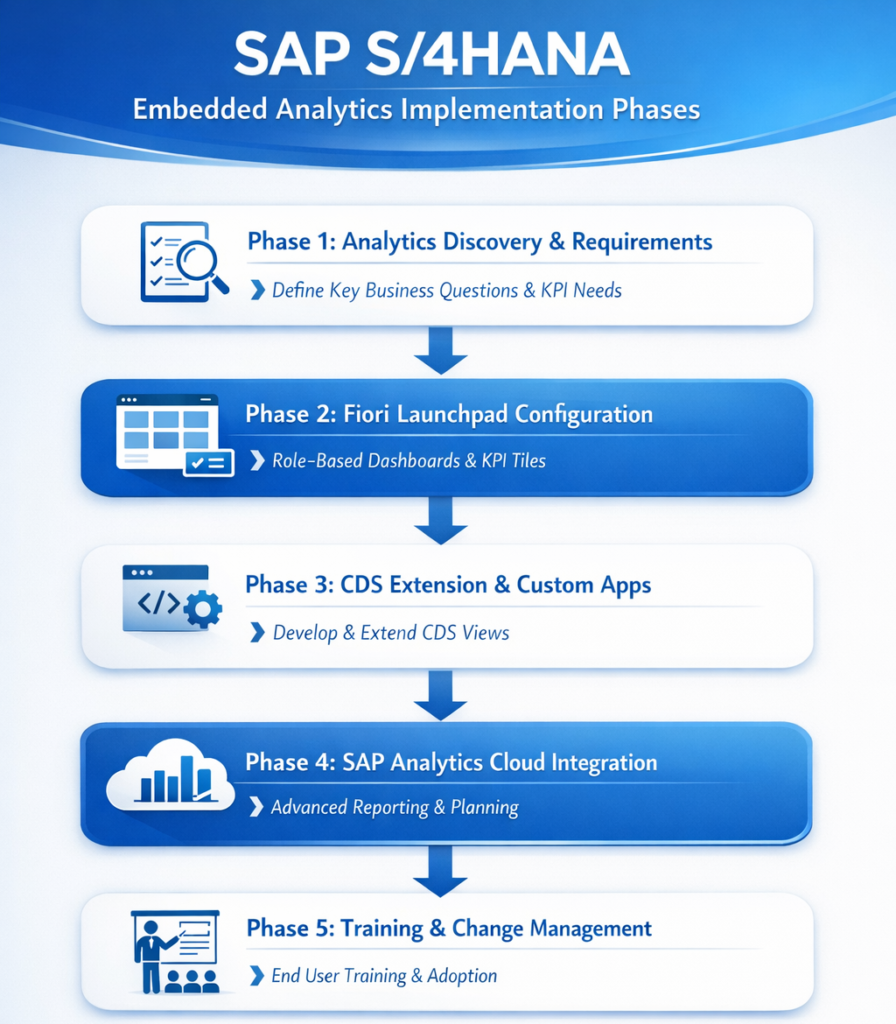
Phase 1: Analytics Discovery & Requirements Workshop
Define the top 20-30 business questions that stakeholders need answered in real time. Map these to existing SAP S/4HANA Fiori analytical apps and CDS views. Identify gaps that require custom development. Establish KPI ownership and data governance rules.
Phase 2: Fiori Launchpad Configuration
Activate the relevant SAP Fiori business catalogs for each user role. Configure tile-based launchpads so each persona (CFO, plant manager, procurement officer) sees their most important KPIs on their home screen. Test authorizations and data scope per user group.
Phase 3: CDS View Extension and Custom App Development
Where standard Fiori apps don’t fully meet requirements, extend existing CDS views or develop custom Fiori elements apps using SAP Business Application Studio. Custom apps should always be built on CDS views – never on direct table access – to ensure upgrade stability.
Phase 4: SAP Analytics Cloud Integration
Connect SAC to S/4HANA via a live data connection for advanced visualizations, forecasting, and planning scenarios. Particularly valuable for consolidation reporting, budgeting cycles, and executive storytelling dashboards.
Phase 5: Training, Adoption & Change Management
Embedded analytics only delivers value when business users actually use it. AIS Business Corp includes role-based training, quick reference guides, and a hypercare period to ensure adoption. Fiori usage analytics are monitored post-go-live to identify low-adoption areas early.
Common Implementation Pitfalls to Avoid
- Attempting to replicate every legacy BW report in S/4HANA instead of redesigning for real-time use cases
- Skipping the data governance and authorization design phase
- Not involving business stakeholders in requirements – letting IT drive the entire project
- Building reports on direct S/4HANA database tables instead of CDS views (causes upgrade risk)
Frequently Asked Questions
Does SAP S/4HANA Embedded Analytics replace the need for SAP BW? For most operational reporting use cases, yes. However, BW or SAP Analytics Cloud remains valuable for consolidated multi-system reporting, long-term historical trend analysis, and complex financial consolidations that span legal entities or source systems outside S/4HANA.
Can we use Embedded Analytics on SAP S/4HANA Cloud (public edition)? Yes. SAP S/4HANA Cloud Public Edition includes embedded analytics through SAP Fiori apps and a tightly integrated connection to SAP Analytics Cloud. The customization scope is more limited than on-premise but covers the majority of standard use cases for finance, procurement, and supply chain.
How long does it take to implement embedded analytics in SAP S/4HANA? Activating standard Fiori analytical apps can take 2-4 weeks if the underlying data model is clean. A full implementation – covering custom KPI dashboards, CDS extensions, and SAC integration – typically takes 8-16 weeks depending on scope and data quality.
What skills are needed to develop custom embedded analytics? Custom development requires expertise in CDS view development, ABAP for HANA, SAP Fiori Elements and SAPUI5, and OData services. For SAC integration, knowledge of SAP Analytics Cloud data modeling and story design is needed. AIS Business Corp provides all of these capabilities as part of our SAP analytics practice.
Is SAP Embedded Analytics suitable for non-technical business users? Absolutely. SAP Fiori analytical apps are built for business users with intuitive, tile-based interfaces, drilldown capabilities, and filter options that require zero technical knowledge. Business users can explore data, export to Excel, and set personal thresholds – all without IT involvement.
Ready to Unlock Real-Time Analytics in SAP S/4HANA?
AIS Business Corp specializes in SAP S/4HANA analytics implementation – from Fiori app activation to custom CDS development and SAP Analytics Cloud integration. Our SAP-certified consultants have helped organizations across manufacturing, finance, and services transform their reporting from batch-based to real-time.
