


In this guide: multi-store retail management software explained end to end — what it does, the features that matter, and how to roll it out in your stores.
the platform gives headquarters one live view — and one set of controls — over every branch: stock, prices, promotions, staff, and performance. The alternative is managing ten businesses by email, spreadsheet, and end-of-day phone calls.
Centralization is what turns a group of stores into a chain. This guide covers what to centralize first, which features separate real multi-store retail management software from glorified POS, and how ERP-based platforms like Retail Pro AI keep every branch synced with purchasing and finance.
What to Centralize First (and What to Leave Local)
Not everything should live at headquarters, and pretending otherwise breeds shadow spreadsheets. Centralize what must be consistent: the item master, pricing rules, promotions, supplier terms, and financial reporting. Leave store-level flexibility where it earns its keep: local displays, staffing rotas, and community marketing.
The dividing line is simple — centralize decisions that protect margin and compliance, localize decisions that serve customers. the hub makes that split explicit, so branches keep personality without creating chaos.
Features That Separate Real Multi-Store Platforms from POS Add-ons
Evaluate candidates against these capabilities before signing anything:
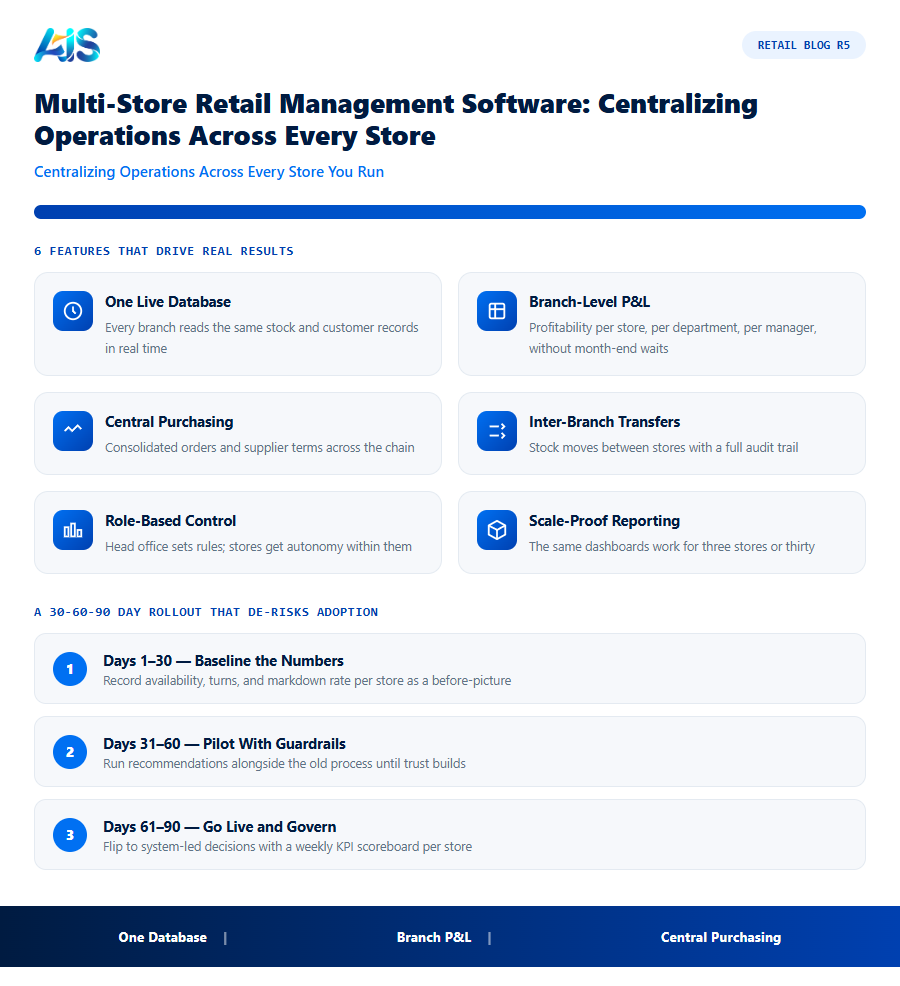
- One live database — every branch reads the same stock and customer records in real time.
- Branch-level P&L — profitability per store, per department, per manager, without month-end waits.
- Central purchasing — consolidated orders and supplier terms across the chain.
- Inter-branch transfers — stock moves between stores with full audit trail.
- Role-based control — head office sets rules; stores get autonomy within them.
- Scale-proof reporting — the same dashboards work for three stores or thirty.
National Retail Federation research keeps showing the same pattern: chains that centralize data outperform on inventory accuracy and margin. The software choice is where that starts.
Why Multi-Store Retail Management Software Beats Point Tools
A POS here, a spreadsheet there, and a standalone inventory app in between: every seam is a place where data goes stale and decisions go wrong. the hub removes the seams — one item master, one price book, one stock ledger across every location.
- One item and price master — change once, live everywhere.
- One stock ledger — transfers are moves, not exports.
- One customer view — loyalty and history follow the shopper across stores.
- One reporting layer — compare stores on identical definitions.
Point tools optimize a task; a multi-store platform optimizes the chain. That difference compounds every trading day.
A Practical Rollout Plan for Multi-Store Retailers
Consolidate master data first — items, barcodes, and prices standardized across sites. Onboard one store, prove cycle-count accuracy and transfer speed, then wave the rest on a weekly cadence. Chain your replenishment go-live to the final wave so automated ordering starts on clean data. Retailers that follow this sequence typically cut stock discrepancies sharply within the first quarter and reach accurate, chain-wide stock visibility without pausing trading.
Branch-level reconciliation is covered in our guide to multi-branch retail distribution..
How the Investment Pays for Itself
The business case for the platform is unusually straightforward because the costs of the status quo are visible every single week — in markdowns, rush orders, overtime, and write-offs. Put numbers on those leaks and the software starts paying for itself.
Then look at working capital. Inventory is usually a retailer’s largest use of cash after property, so a ten to fifteen percent reduction in average holdings — a realistic outcome once the hub is running — releases funds that can pay down debt or fund new ranges. Labour is the third lever: buyers, planners, and store managers reclaim hours previously lost to spreadsheets, stock counts, and expediting.
There is also a compounding effect that spreadsheets understate. Cleaner stock data improves every downstream decision: forecasts get sharper, suppliers perform better against reliable orders, and store teams stop firefighting. Each quarter the system runs, the recommendations get more precise because they learn from more history — the return grows while the subscription cost stays flat.
A 30-60-90 Day Rollout That De-risks Adoption
The safest way to adopt the platform is in waves: prove it in a few stores, harden the process, then scale. A 30-60-90 day plan keeps momentum while giving every stakeholder an early win.
Training is lighter than most teams fear. Store champions need a single hands-on session plus a one-page crib sheet; buyers and planners need half a day on approvals, exceptions, and tuning. Because daily work happens through familiar screens and plain-language alerts, adoption rarely becomes the bottleneck.
- Days 1-30 — baseline the numbers: record availability, turns, and markdown rate per store so the hub has a before-picture to beat.
- Days 31-60 — pilot with guardrails: run system recommendations alongside the old process, overriding only with a logged reason, until trust builds.
- Days 61-90 — go live and govern: flip to system-led decisions, review exceptions weekly, and publish a visible KPI scoreboard per store.
Signs Your Stores Have Outgrown Spreadsheets and Standalone Tools
Multi-store retail management software becomes necessary at a fairly predictable point in a chain’s growth. These are the warning signs that the current setup is holding the business back:
- Store managers keep their own shadow spreadsheets because they do not trust the numbers coming from head office — a sure sign data is out of sync somewhere in the chain.
- Month-end reporting takes days, not hours, because someone has to manually consolidate figures from each store or system.
- Pricing and promotions go live at different times in different stores because there is no single point of control to push changes everywhere at once.
- New store openings take months to fully integrate into reporting and purchasing because each location needs its own manual setup.
- Head office cannot answer “which stores are underperforming and why” without a special project — the data exists, but it is not centralized enough to query quickly.
Any one of these on its own is manageable. Two or three together are a strong signal that centralizing operations under one multi-store retail management platform will pay back quickly, both in hours saved and in decisions made with better information.
Growth itself is usually the trigger. A chain that comfortably ran five stores on spreadsheets often finds the same approach breaks down somewhere between store eight and store twelve, not because any single store got harder to manage, but because the number of manual reconciliations grows faster than the store count. Recognizing that inflection point early, rather than after a costly stock error or missed reporting deadline, is what separates chains that centralize proactively from those forced into it by a crisis.
Governance Models: How Much Should Head Office Actually Control?
Multi-store retail management software makes centralization possible, but it does not decide how tightly to use that control — that is a governance choice each chain has to make deliberately, and getting it wrong in either direction causes friction. Three governance patterns cover most retailers:
- Locked-down central control — head office sets prices, promotions, and item ranges; stores execute without local override. This suits highly standardized formats like convenience or quick-service retail, where consistency matters more than local adaptation, but it frustrates store managers in markets with genuinely different customer bases.
- Guided autonomy — head office sets guardrails (price bands, approved promotion types, core range requirements) and stores operate freely inside them. This is the most common pattern among mid-size chains, because it protects margin and brand consistency while letting a store manager respond to a local competitor or event without waiting for head-office sign-off.
- Federated model — each store or region operates close to independently, with head office consolidating only for financial reporting. This suits multi-banner groups or franchise-heavy chains where individual locations genuinely operate as separate businesses.
The mistake most chains make is picking a governance model implicitly, by whatever the software defaults to, rather than deciding deliberately. A platform built only for locked-down control forces federated businesses into a straitjacket; one built only for loose autonomy lets a guided-autonomy business drift into pricing chaos.
Integrating New Store Openings Without Losing Momentum
Growing chains often treat each new store opening as a one-off IT project, which is exactly what multi-store retail management software is meant to eliminate. A well-configured platform turns store onboarding into a repeatable checklist rather than a bespoke effort each time:
- Item and price master inherits automatically from a template store or region, so a new location opens with the correct catalog and pricing from day one rather than a manual data entry exercise.
- Opening stock loads from a standard transfer template tied to the store’s format and size, avoiding the guesswork of a first-time buy built from scratch.
- Reporting and KPIs activate immediately because the new store simply becomes another row in existing dashboards, not a separate spreadsheet someone has to remember to build.
Chains that get this right can compress a new-store data setup from several weeks down to a few days, letting the team focus opening-week effort on hiring, merchandising, and local marketing instead of chasing down master data.
Multi-store retail management software: Frequently Asked Questions
How many stores justify multi-store retail management software?
Most retailers feel the pain between two and five stores — duplicated stock counts, inconsistent pricing, and manual reporting. If head office spends hours consolidating spreadsheets weekly, the software pays for itself quickly.
Will stores lose flexibility under central control?
No — good platforms centralize the data layer while leaving approved local flexibility: store-specific promotions, layouts, and rotas that fit within head-office rules.
Can it connect to an ERP like SAP Business One?
ERP-native platforms like Retail Pro AI run on SAP Business One itself, so branch operations, purchasing, and finance share one live database instead of syncing between systems.
What data do we need before starting with multi-store retail management software?
Clean item masters, accurate opening stock per location, supplier lead times, and at least six months of sales history. Most retailers already hold all four inside their POS and ERP — the implementation work is validation and deduplication, typically completed inside the first month.
Can small retail chains afford this kind of platform?
Yes. Cloud pricing scales with stores and users, so a five-store chain pays a fraction of what an enterprise deployment costs. Because the savings come from the same leaks — stockouts, markdowns, overstock — smaller chains often see faster payback in percentage terms.
Does this kind of platform replace our buyers and planners?
No — it upgrades them. the platform handles the repetitive arithmetic of forecasting and ordering so buyers can negotiate better terms, planners can shape ranges, and store teams can serve customers. Headcount rarely falls; output per head rises sharply.
the hub replaces the daily scramble of calls, exports, and conflicting numbers with one live, controllable view of every branch. Centralize the money-critical decisions, keep the customer-facing ones local, and your chain scales without the growing pains. If there is one action to take this week, let it be this: pick your three worst-performing stores on availability, baseline their numbers, and run a ninety-day pilot of the hub against them. The data will make the rollout decision for you. See how Retail Pro AI brings multi-store retail management software together with AI inside SAP Business One — book a demo to see your own store data in action.
