


Introduction
Ask anyone who has spent time in SAP GUI – the traditional SAP interface – and the feedback is usually the same. Hundreds of transaction codes to memorize. Cluttered screens packed with fields that most users never touch. No mobile access. No personalization. A user experience designed for SAP power users in the 1990s, still running in enterprises today.
This is not just a cosmetic problem. Poor user experience in enterprise software has real business consequences – slow onboarding, high error rates, low adoption, shadow IT, and frustrated employees who work around the system instead of within it.
SAP Fiori was SAP’s answer to this problem. And with SAP S/4HANA, Fiori is not just an optional overlay – it is the default, strategic user interface for the entire ERP platform. Understanding what SAP Fiori UX is, what it delivers, and how to implement it well is one of the most important decisions any S/4HANA customer will make.
What is SAP Fiori?
SAP Fiori is the UX design system and application framework that powers the user interface of SAP S/4HANA. It replaces the traditional SAP GUI with a modern, browser-based, role-specific, and device-responsive experience built on the SAPUI5 framework – SAP’s implementation of web standards including HTML5, CSS3, and JavaScript.
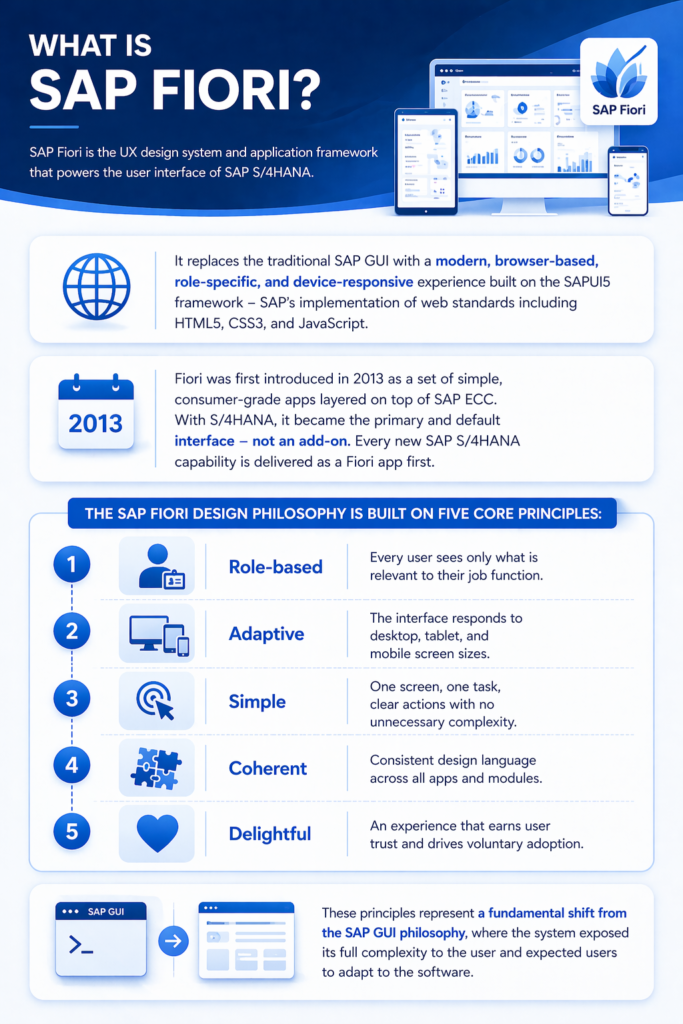
Fiori was first introduced in 2013 as a set of simple, consumer-grade apps layered on top of SAP ECC. With S/4HANA, it became the primary and default interface – not an add-on. Every new SAP S/4HANA capability is delivered as a Fiori app first.
The SAP Fiori design philosophy is built on five core principles:
- Role-based – every user sees only what is relevant to their job function
- Adaptive – the interface responds to desktop, tablet, and mobile screen sizes
- Simple – one screen, one task, clear actions with no unnecessary complexity
- Coherent – consistent design language across all apps and modules
- Delightful – an experience that earns user trust and drives voluntary adoption
These principles represent a fundamental shift from the SAP GUI philosophy, where the system exposed its full complexity to the user and expected users to adapt to the software.
SAP Fiori vs SAP GUI: Why the Difference Matters
Many organizations running SAP today still rely primarily on SAP GUI – either because they have not yet migrated to S/4HANA, or because their S/4HANA implementation did not prioritize Fiori adoption. Understanding the practical difference between the two is essential for building the business case for Fiori investment.
| Dimension | SAP Fiori | SAP GUI |
| Interface Type | Browser-based, responsive web | Desktop client application |
| Device Support | Desktop, tablet, mobile | Desktop only |
| User Onboarding Time | Hours to days | Weeks to months |
| Personalization | Role-based tiles, themes, layouts | Minimal |
| Navigation Model | App-based, tile launchpad | Transaction code driven |
| Real-Time Data | Native via embedded analytics | Limited |
| Accessibility | WCAG 2.1 compliant | Limited |
| Upgrade Compatibility | Continuous SAP updates | Stable but aging |
| User Satisfaction | High in adoption studies | Consistently poor |
| Best For | All business users in S/4HANA | Technical/power users, legacy systems |
The business impact of this difference is measurable. Organizations that invest in a well-designed SAP Fiori UX implementation consistently report faster user onboarding, lower training costs, higher process compliance rates, and reduced IT support tickets compared to SAP GUI-based environments.
The SAP Fiori Application Types Explained
Not all SAP Fiori apps are built the same way. Understanding the three main application types helps organizations know what they are working with – and what level of effort customization requires.
Transactional Apps
These apps allow users to create, read, update, and delete business objects – posting goods receipts, creating purchase orders, approving invoices, submitting timesheets. They are the workhorses of daily SAP operations and account for the majority of SAP Fiori apps in the standard library.
Analytical Apps
Analytical apps display KPIs, charts, and real-time business data. They connect directly to the embedded analytics layer of S/4HANA, giving users live operational insight without leaving their Fiori launchpad. Examples include cash flow dashboards, supplier performance scorecards, and production order status overviews.
Fact Sheet Apps
Fact sheets provide a 360-degree contextual view of a business object – a customer, a vendor, a material, a plant. They are read-only, information-rich screens designed for quick lookup and navigation. A sales manager looking up a customer can see their open orders, payment history, credit exposure, and recent interactions – all on one screen.
SAP Fiori Launchpad: The Command Center for S/4HANA Users
The SAP Fiori Launchpad is the entry point and home screen for every S/4HANA user. It replaces the SAP Easy Access menu and transaction code navigation with a personalized, tile-based interface that puts the most relevant apps and KPIs front and center for each user role.
Key capabilities of the SAP Fiori Launchpad include:
Role-Based Tile Configuration
System administrators assign app tiles to users based on their business role – finance clerk, procurement manager, plant controller, HR business partner. Users see only the apps they are authorized to use, creating a clean and uncluttered workspace.
Dynamic Tiles with Live KPIs
Certain tiles are “dynamic” – they display live data values directly on the tile surface. A finance controller’s launchpad tile for “Overdue Receivables” shows the actual overdue amount in real time. A procurement manager sees the number of purchase requisitions awaiting approval. This turns the launchpad into a live operational dashboard, not just a navigation menu.
Personalization and User Control
Users can rearrange tiles, create custom groups, pin frequently used apps, and adjust display settings to match their workflow preferences – without IT involvement. This level of personal control dramatically increases user satisfaction and adoption rates.
SAP Task Center Integration
The SAP Task Center is surfaced as a tile within the Fiori Launchpad, giving users a single inbox for all workflow approvals – regardless of which SAP system they originate from. Approvals from S/4HANA, Ariba, SuccessFactors, and Concur all appear in one place.
High-Impact SAP Fiori UX Use Cases
Finance: Streamlined Period-End Close
Finance teams using SAP Fiori apps for journal entry, account clearing, and financial reporting experience dramatically faster period-end close cycles. The intuitive interface reduces entry errors, the real-time posting feedback eliminates reprocessing, and the guided close cockpit ensures every close task is completed in sequence.
Procurement: Mobile-First Purchase Approval
Procurement managers and budget holders can review and approve purchase requisitions and purchase orders from any device – including smartphones – using SAP Fiori mobile apps. Approvals that previously waited for a manager to return to their desk now happen in minutes, accelerating the entire procurement cycle.
Plant Maintenance: Technician Mobility
Maintenance technicians working on the shop floor or in the field can use SAP Fiori apps on tablets or ruggedized mobile devices to receive work orders, record time confirmations, post material consumption, and update equipment status – without returning to a desk or using a paper-based process. This real-time feedback loop improves maintenance planning accuracy and asset data quality significantly.
HR Self-Service: Employee and Manager Workflows
SAP Fiori delivers intuitive self-service experiences for employees – submitting leave requests, viewing payslips, updating personal data, enrolling in benefits – and for managers – approving timesheets, managing team absence calendars, running headcount reports. These self-service workflows dramatically reduce HR administrative overhead while improving the employee experience.
Sales: Order Status and Customer Insight
Sales representatives can use Fiori apps to check customer order status, review delivery schedules, look up pricing and availability, and process returns – all from a single, mobile-accessible interface. Customer-facing responsiveness improves because reps have the information they need without waiting for back-office support.
SAP Fiori UX Implementation: What It Really Takes
Many S/4HANA implementations treat Fiori as an afterthought – activating standard apps without designing the user experience intentionally. The result is a Fiori launchpad that looks modern but functions poorly – too many tiles, wrong apps for the right roles, no training, and users who revert to SAP GUI within weeks.
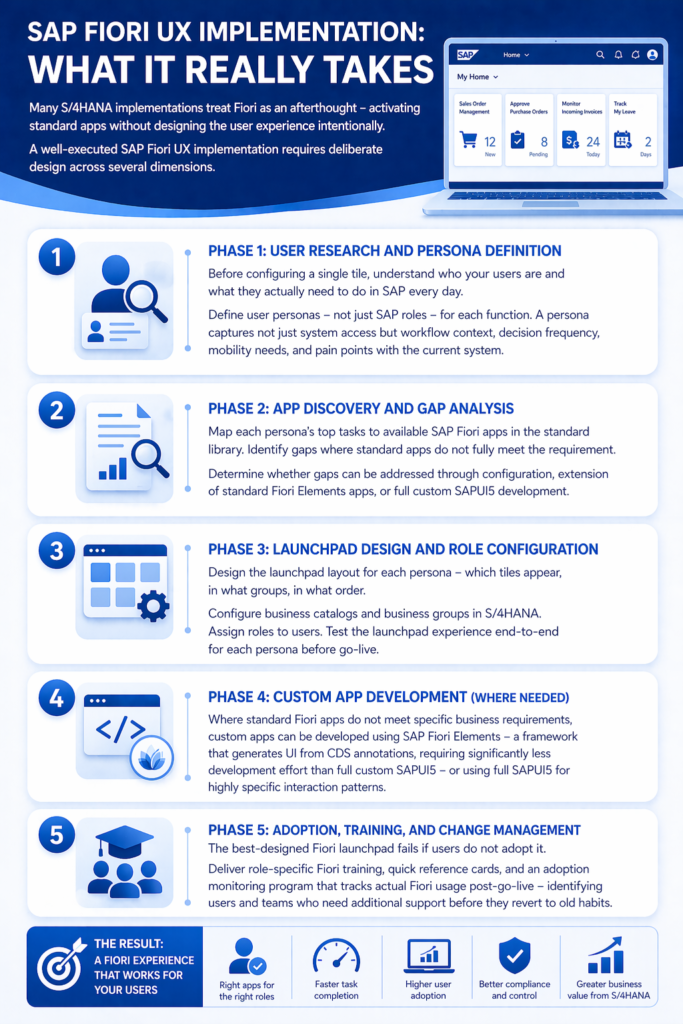
A well-executed SAP Fiori UX implementation requires deliberate design across several dimensions.
Phase 1: User Research and Persona Definition
Before configuring a single tile, understand who your users are and what they actually need to do in SAP every day. Define user personas – not just SAP roles – for each function. A persona captures not just system access but workflow context, decision frequency, mobility needs, and pain points with the current system.
Phase 2: App Discovery and Gap Analysis
Map each persona’s top tasks to available SAP Fiori apps in the standard library. Identify gaps where standard apps do not fully meet the requirement. Determine whether gaps can be addressed through configuration, extension of standard Fiori Elements apps, or full custom SAPUI5 development.
Phase 3: Launchpad Design and Role Configuration
Design the launchpad layout for each persona – which tiles appear, in what groups, in what order. Configure business catalogs and business groups in S/4HANA. Assign roles to users. Test the launchpad experience end-to-end for each persona before go-live.
Phase 4: Custom App Development (Where Needed)
Where standard Fiori apps do not meet specific business requirements, custom apps can be developed using SAP Fiori Elements – a framework that generates UI from CDS annotations, requiring significantly less development effort than full custom SAPUI5 – or using full SAPUI5 for highly specific interaction patterns.
Phase 5: Adoption, Training, and Change Management
The best-designed Fiori launchpad fails if users do not adopt it. AIS Business Corp delivers role-specific Fiori training, quick reference cards, and an adoption monitoring program that tracks actual Fiori usage post-go-live – identifying users and teams who need additional support before they revert to old habits.
Common SAP Fiori Implementation Mistakes to Avoid
Activating too many apps at once. A launchpad with 60 tiles is as overwhelming as SAP GUI. Start with the 8-12 most important apps per persona and expand based on user feedback.
Skipping the persona design phase. Configuring Fiori based on SAP authorization roles alone – without understanding actual user workflows – produces a technically correct but practically poor experience.
Ignoring mobile use cases. If your workforce includes field technicians, sales reps, or managers who travel, mobile Fiori is not optional. Design and test the mobile experience explicitly, not as an afterthought.
Treating Fiori as a cosmetic upgrade. SAP Fiori UX is most powerful when it is connected to process redesign – simplifying workflows, eliminating redundant steps, and automating approvals in parallel with the UX implementation.
Not maintaining the Fiori landscape post-go-live. SAP delivers new and improved Fiori apps with every S/4HANA release. Organizations that do not have a process for evaluating and adopting new apps fall behind quickly.
Frequently Asked Questions
Is SAP Fiori available for SAP S/4HANA on-premise and cloud? Yes. SAP Fiori is the default UI for both SAP S/4HANA on-premise and SAP S/4HANA Cloud (public and private editions). The app catalog and configuration approach differ slightly between deployment models, but the core Fiori design system and launchpad experience are consistent across all editions.
Can SAP GUI and SAP Fiori coexist during an S/4HANA implementation? Absolutely. Most S/4HANA implementations run SAP GUI and Fiori in parallel – Fiori for business users performing standard operational tasks, and SAP GUI for technical users, system administrators, and power users running complex transactions or custom programs. A phased Fiori adoption strategy typically achieves full business user migration to Fiori within 12-18 months of go-live.
How many SAP Fiori apps are available in the standard S/4HANA library? SAP delivers over 1,500 standard Fiori apps for SAP S/4HANA covering all functional areas – finance, procurement, supply chain, manufacturing, sales, HR, and IT. The full catalog is searchable through the SAP Fiori Apps Reference Library on the SAP Help Portal.
What is the difference between SAP Fiori Elements and custom SAPUI5 development? SAP Fiori Elements is a framework that generates UI from CDS view annotations – requiring significantly less frontend development effort and automatically applying SAP’s Fiori design guidelines. It is the recommended approach for most custom app development. Full custom SAPUI5 development is reserved for highly specific interaction patterns that Fiori Elements cannot accommodate – typically less than 20% of custom app requirements.
How does SAP Fiori support accessibility requirements? SAP Fiori is designed to comply with WCAG 2.1 Level AA accessibility standards, supporting screen readers, keyboard navigation, high-contrast themes, and text scaling. For organizations with enterprise accessibility mandates or public sector accessibility requirements, SAP Fiori significantly outperforms SAP GUI in accessibility compliance.
Ready to Transform Your SAP User Experience with Fiori?
AIS Business Corp delivers end-to-end SAP Fiori UX implementation – from persona design and app activation to custom Fiori development and post-go-live adoption programs. Our SAP-certified UX consultants have helped organizations across industries move from SAP GUI frustration to Fiori-powered productivity.
Whether you are planning a new S/4HANA implementation, optimizing an existing Fiori deployment, or building custom Fiori apps for specialized workflows – we have the expertise to deliver an experience your users will actually want to use.
