


Introduction
In business, the value of information decays the moment it is generated. A cash flow report that reflects yesterday’s transactions is already incomplete. A supply chain exception report that runs every 24 hours means problems have been compounding for hours before anyone sees them. A financial dashboard that relies on last night’s data warehouse load cannot support the kind of fast, confident decision-making that modern enterprises demand.
For decades, SAP ECC users accepted this reality as an unavoidable constraint of enterprise software architecture. Reporting lived in a separate layer – Business Warehouse, BusinessObjects, spreadsheets – fed by batch extracts that ran overnight. Business leaders made decisions based on data that was always, to some degree, out of date.
SAP S/4HANA changes this at the architectural level. Real-time reporting in S/4HANA is not a feature upgrade or a bolt-on tool – it is a fundamental consequence of building an ERP on an in-memory database that processes transactions and analytics simultaneously. When a sales order is posted, it is immediately visible in every relevant report. When inventory moves, stock reports update in real time. When a payment clears, the cash position reflects it instantly.
This guide explains how real-time reporting works in SAP S/4HANA, what capabilities it delivers across every business function, and how organizations can implement it to maximum effect.
What is Real-Time Reporting in SAP S/4HANA?
Real-time reporting in SAP S/4HANA refers to the ability to generate business reports, dashboards, and analytical outputs that reflect the current state of business data – with no lag between when a transaction is posted and when it appears in reports.
This capability is made possible by three foundational architectural elements unique to SAP S/4HANA:
The SAP HANA In-Memory Database
SAP HANA stores all data in memory – RAM – rather than on disk. This eliminates the read latency associated with traditional database architectures, allowing queries that previously took minutes to execute in milliseconds. More importantly, HANA supports both OLTP (transactional) and OLAP (analytical) workloads on the same data simultaneously – meaning the same data that powers transactions also powers reports, with no replication or staging required.
The Universal Journal (ACDOCA)
SAP S/4HANA introduced the Universal Journal – a single, unified accounting document table (ACDOCA) that consolidates financial accounting, controlling, asset accounting, and profitability analysis into one source of truth. Previously, these subledgers existed in separate tables and required reconciliation. The Universal Journal eliminates reconciliation entirely – there is one number, always current, always consistent across every financial report.
CDS Views as the Reporting Layer
Core Data Services (CDS) views form the semantic reporting layer on top of S/4HANA tables. Instead of building reports directly against database tables – which is fragile and upgrade-risky – all reporting in S/4HANA is built on CDS views that encapsulate business logic, authorization checks, and data relationships. SAP delivers hundreds of standard CDS views covering every module, and custom CDS views can be developed for organization-specific reporting needs.
What this means in practice:
- Zero delay between transaction posting and report visibility
- No overnight batch runs required for operational reports
- No reconciliation between financial subledgers
- No separate data warehouse needed for standard operational reporting
- Every user always sees the same, consistent numbers
Why Real-Time Reporting is a Competitive Advantage
Faster Financial Close
The financial close process – monthly, quarterly, annual – is one of the most resource-intensive, time-pressured workflows in any finance organization. In SAP ECC environments, close cycles are extended by the need to reconcile data across multiple subledgers, wait for batch extracts to complete, and manually verify that numbers in different reports match.
In SAP S/4HANA, the Universal Journal eliminates subledger reconciliation. Real-time posting visibility means the finance team can monitor close progress continuously rather than waiting for end-of-day batch runs. Organizations routinely reduce their financial close cycle by 30-50% after moving to S/4HANA with a well-implemented real-time reporting strategy.
Operational Agility
Real-time operational reporting changes how managers respond to business events. A procurement manager who sees a supplier delivery exception in real time can intervene before it becomes a production stoppage. A sales manager who monitors order intake in real time can identify a slowdown and trigger a corrective action within hours – not after the weekly sales review meeting.
Eliminating Spreadsheet Culture
In most SAP ECC organizations, the real reporting layer is Excel. Business analysts extract data from SAP, massage it in spreadsheets, and distribute reports via email. This process is slow, error-prone, inconsistently governed, and almost impossible to audit. Real-time reporting in SAP S/4HANA eliminates the need for this shadow reporting infrastructure – reports live in the system, not in individual inboxes.
Better Audit and Compliance Readiness
Real-time reports in S/4HANA are always traceable to their source documents. Every number on a financial report drills through to the underlying journal entries, purchase orders, or goods movements that produced it. This audit trail – always current, always complete – dramatically reduces the time and effort required for internal and external audits.
Core Real-Time Reporting Capabilities in SAP S/4HANA
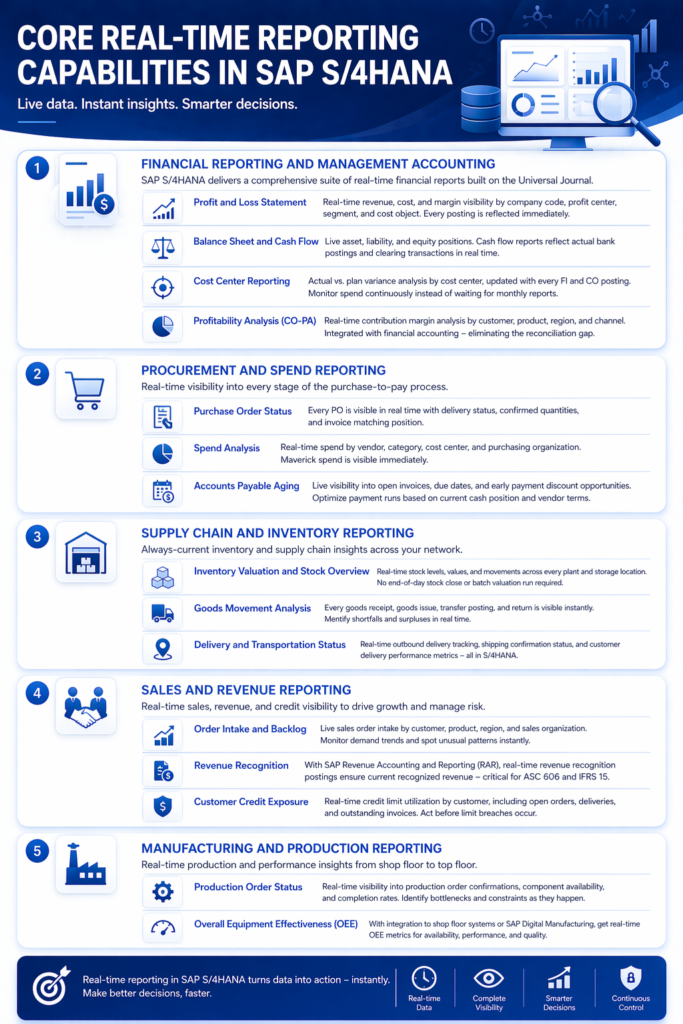
Financial Reporting and Management Accounting
SAP S/4HANA delivers a comprehensive suite of real-time financial reports built on the Universal Journal. These include:
Profit and Loss Statement – real-time revenue, cost, and margin visibility by company code, profit center, segment, and cost object. No period-end accrual estimation required – every posting is reflected immediately.
Balance Sheet and Cash Flow – live asset, liability, and equity positions. Cash flow reports reflect actual bank postings and clearing transactions in real time, giving treasury teams current liquidity visibility at any moment.
Cost Center Reporting – actual vs. plan variance analysis by cost center, updated with every FI and CO posting. Budget owners can monitor spend continuously instead of waiting for monthly variance reports.
Profitability Analysis (CO-PA) – real-time contribution margin analysis by customer, product, region, and channel. S/4HANA’s universal journal integrates CO-PA postings with financial accounting – eliminating the reconciliation gap that plagued ECC profitability reporting.
Procurement and Spend Reporting
Real-time procurement reporting in S/4HANA gives procurement teams live visibility into every stage of the purchase-to-pay process:
Purchase Order Status – every PO is visible in real time with current delivery status, confirmed quantities, and invoice matching position. Buyers always know where every order stands without chasing vendors or waiting for a status report.
Spend Analysis – real-time spend by vendor, category, cost center, and purchasing organization. Maverick spend – purchases outside contracted sources – is visible immediately, not discovered in a quarterly audit.
Accounts Payable Aging – live visibility into open invoices, due dates, and early payment discount opportunities. AP managers can optimize payment runs based on current cash position and vendor terms.
Supply Chain and Inventory Reporting
Inventory Valuation and Stock Overview – real-time stock levels, values, and movements across every plant and storage location. Inventory reports in S/4HANA are always current – there is no end-of-day stock close or batch valuation run required for standard reporting.
Goods Movement Analysis – every goods receipt, goods issue, transfer posting, and return is immediately visible in inventory reports. Supply chain planners can identify shortfalls and surpluses in real time rather than discovering them when picking orders fail.
Delivery and Transportation Status – real-time outbound delivery tracking, shipping confirmation status, and customer delivery performance metrics – all visible to logistics coordinators without leaving S/4HANA.
Sales and Revenue Reporting
Order Intake and Backlog – live sales order intake by customer, product, region, and sales organization. Sales leaders can monitor demand trends in real time and identify unusual patterns – spikes, drops, or seasonal deviations – immediately.
Revenue Recognition – for organizations using SAP Revenue Accounting and Reporting (RAR), real-time revenue recognition postings ensure that revenue reports always reflect the current recognized position – critical for ASC 606 and IFRS 15 compliance.
Customer Credit Exposure – real-time credit limit utilization by customer, incorporating open orders, deliveries, and outstanding invoices. Credit controllers can respond to approaching limit breaches before orders are blocked.
Manufacturing and Production Reporting
Production Order Status – real-time visibility into production order confirmations, component availability, and completion rates. Plant managers can identify bottlenecks and capacity constraints as they develop – not after shifts end.
Overall Equipment Effectiveness (OEE) – when integrated with shop floor systems or SAP Digital Manufacturing, real-time OEE metrics give maintenance and production teams instant visibility into availability, performance, and quality rates.
SAP S/4HANA Real-Time Reporting vs. SAP ECC Reporting
Understanding the architectural difference between S/4HANA and ECC reporting is essential for building the business case for migration or reporting modernization.
| Dimension | SAP S/4HANA Real-Time Reporting | SAP ECC Reporting |
| Data Freshness | Real-time – zero lag | Batch – typically nightly or weekly |
| Financial Subledger Reconciliation | Not required – Universal Journal | Required – FI/CO/AA reconciliation |
| Separate Data Warehouse Needed | No – for operational reporting | Yes – BW typically required |
| Report Execution Speed | Milliseconds to seconds | Minutes to hours for complex reports |
| Drill-Through to Source Documents | Native, always available | Limited – depends on extract configuration |
| Consistent Numbers Across Reports | Always – single source of truth | Often inconsistent across subledgers |
| Self-Service for Business Users | Yes – SAP Fiori analytical apps | No – IT-dependent report requests |
| Excel Dependency | Dramatically reduced | Very high – shadow reporting culture |
| Audit Trail | Complete and real-time | Partial – depends on BW setup |
| Mobile Access | Native via SAP Fiori | Not available in standard |
Implementing Real-Time Reporting in SAP S/4HANA: A Proven Approach
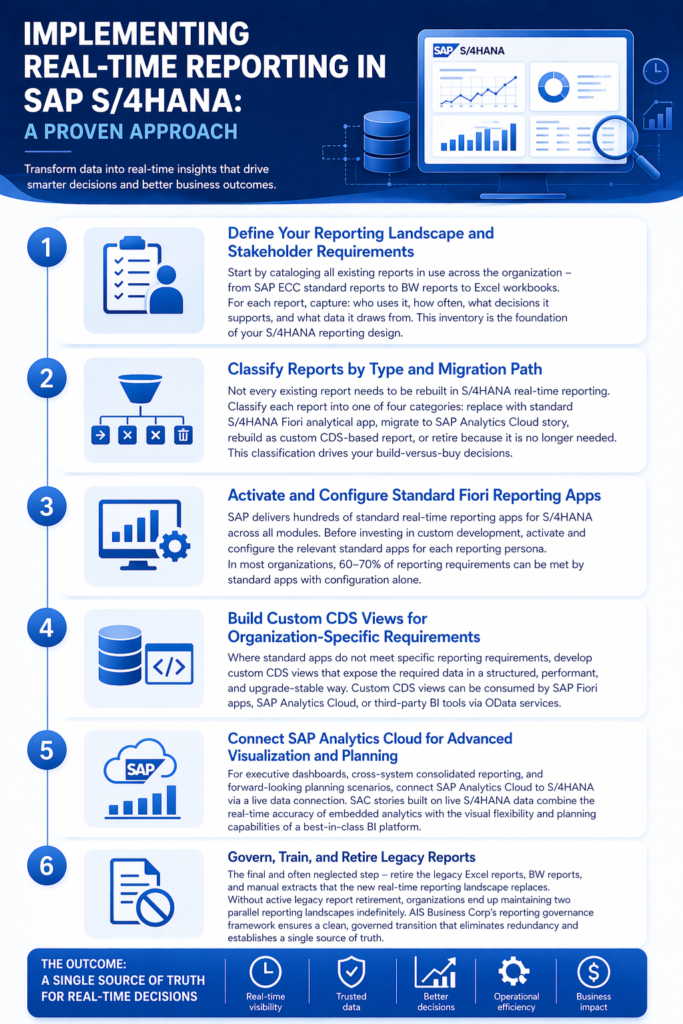
Step 1: Define Your Reporting Landscape and Stakeholder Requirements
Start by cataloging all existing reports in use across the organization – from SAP ECC standard reports to BW reports to Excel workbooks. For each report, capture: who uses it, how often, what decisions it supports, and what data it draws from. This inventory is the foundation of your S/4HANA reporting design.
Step 2: Classify Reports by Type and Migration Path
Not every existing report needs to be rebuilt in S/4HANA real-time reporting. Classify each report into one of four categories: replace with standard S/4HANA Fiori analytical app, migrate to SAP Analytics Cloud story, rebuild as custom CDS-based report, or retire because it is no longer needed. This classification drives your build-versus-buy decisions.
Step 3: Activate and Configure Standard Fiori Reporting Apps
SAP delivers hundreds of standard real-time reporting apps for S/4HANA across all modules. Before investing in custom development, activate and configure the relevant standard apps for each reporting persona. In most organizations, 60-70% of reporting requirements can be met by standard apps with configuration alone.
Step 4: Build Custom CDS Views for Organization-Specific Requirements
Where standard apps do not meet specific reporting requirements, develop custom CDS views that expose the required data in a structured, performant, and upgrade-stable way. Custom CDS views can be consumed by SAP Fiori apps, SAP Analytics Cloud, or third-party BI tools via OData services.
Step 5: Connect SAP Analytics Cloud for Advanced Visualization and Planning
For executive dashboards, cross-system consolidated reporting, and forward-looking planning scenarios, connect SAP Analytics Cloud to S/4HANA via a live data connection. SAC stories built on live S/4HANA data combine the real-time accuracy of embedded analytics with the visual flexibility and planning capabilities of a best-in-class BI platform.
Step 6: Govern, Train, and Retire Legacy Reports
The final and often neglected step – retire the legacy Excel reports, BW reports, and manual extracts that the new real-time reporting landscape replaces. Without active legacy report retirement, organizations end up maintaining two parallel reporting landscapes indefinitely. AIS Business Corp’s reporting governance framework ensures a clean, governed transition that eliminates redundancy and establishes a single source of truth.
Frequently Asked Questions
Does real-time reporting in SAP S/4HANA require SAP Analytics Cloud? No. Real-time reporting is available natively in S/4HANA through SAP Fiori analytical apps and CDS-based reports without SAP Analytics Cloud. SAC enhances the reporting capability with advanced visualization, planning, and predictive features – but it is optional for organizations whose standard reporting needs are met by Fiori apps alone.
Can SAP S/4HANA real-time reports be accessed on mobile devices? Yes. All SAP Fiori reporting apps are fully responsive and accessible from smartphones and tablets through a mobile browser or the SAP Fiori Client app. This is particularly valuable for managers and executives who need KPI visibility while away from their desks.
How does real-time reporting handle data volume and system performance? SAP HANA’s in-memory architecture is specifically designed to handle large data volumes with analytical query performance. Column-store data organization, data compression, and parallel query execution ensure that real-time reporting remains fast even on systems with billions of records. For very complex reports on extremely large datasets, query optimization through CDS view design and HANA calculation views further improves performance.
Can third-party BI tools like Power BI or Tableau connect to S/4HANA real-time data? Yes. SAP S/4HANA exposes data through OData services and the SAP HANA database, enabling third-party BI tools to connect and report on live S/4HANA data. However, direct third-party connections require careful governance to ensure performance, security, and data consistency. SAP Analytics Cloud is the recommended primary BI tool for S/4HANA customers given its native, deeply optimized live data connection.
What happens to our SAP BW investment when we move to S/4HANA real-time reporting? SAP BW remains valuable for use cases that require long-term historical data retention, cross-system consolidation across multiple source systems, or complex multi-dimensional analysis that goes beyond S/4HANA’s operational data scope. The recommended approach is a hybrid landscape – S/4HANA embedded analytics for real-time operational reporting, and a leaner, modernized BW or SAP Datasphere layer for enterprise-wide consolidation and historical analysis.
Ready to Move from Batch Reports to Real-Time Business Intelligence?
AIS Business Corp helps SAP customers design and implement real-time reporting strategies across their S/4HANA landscape – from Universal Journal financial reporting to live supply chain dashboards and SAP Analytics Cloud integration.
Our SAP-certified reporting consultants start with a reporting landscape assessment – analyzing your current report inventory, identifying quick wins from standard Fiori app activation, and building a phased roadmap to a fully real-time reporting environment.
