


In this guide: AI for SAP Business One retail explained end to end — what it does, the features that matter, and how to roll it out in your stores.
the AI layer is the fastest way for a growing chain to get enterprise-grade intelligence without an enterprise budget. SAP Business One already holds your items, stock, sales, and purchasing history; an AI layer on top turns that data into forecasts, replenishment decisions, and plain-English answers your buyers and store managers can use the same day.
This guide shows exactly where AI helps in a SAP Business One retail operation — inventory, sales, and store operations — and how to adopt it in weeks rather than quarters.
What AI for SAP Business One Retail Adds to Stores
SAP Business One is an excellent system of record: accurate transactions, one ledger, real finance. What it does not do out of the box is predict and explain. The AI layer adds three capabilities the standard ERP leaves to spreadsheets: per-store demand forecasting, automated suggestions (replenishment, transfers, markdowns), and conversational analytics — ask a question, get a chart and the reasoning.
Because the AI reads the same database your finance team trusts, every number agrees. No parallel spreadsheet layer, no version wars — that single source of truth is what makes the AI layer practical rather than experimental.
Inventory: Forecasting, Optimization and Replenishment
Inventory is where AI pays first. Models learn each store’s seasonality and size-level demand, then drive three automations:
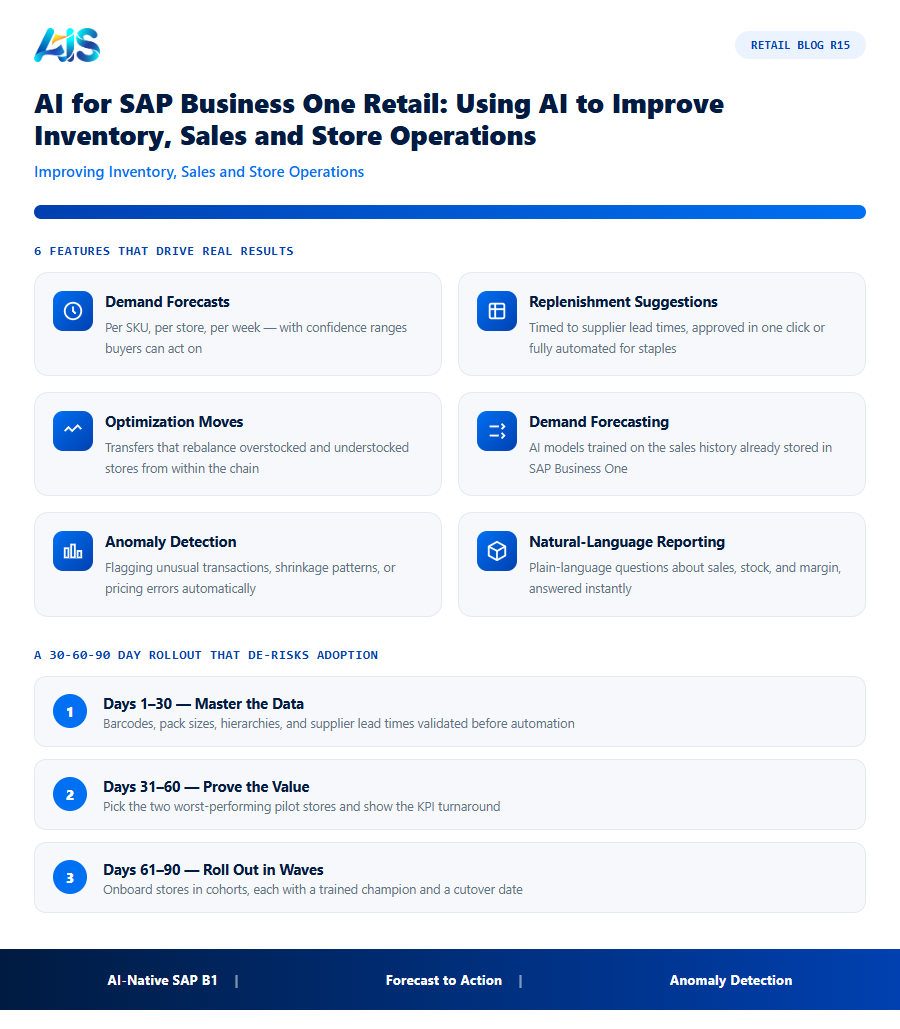
- Demand forecasts per SKU, per store, per week — with confidence ranges buyers can act on.
- Replenishment suggestions timed to supplier lead times, approved in one click or fully automated for staples.
- Optimization moves — transfers that rebalance overstocked and understocked stores from within the chain.
The measured outcomes retailers report are consistent: fewer stockouts on winners, lower excess on losers, and purchasing decisions that take minutes instead of days.
Sales and Store Operations: Answers on Demand
The second win is conversational. Store managers ask “how did we do yesterday against last week?” and get an instant chart; buyers ask “which suppliers are late on this week’s deliveries?” and get an exception list; owners get a daily briefing summarizing sales, margin, and exceptions across every store. SAP Business One provides the data spine — the AI makes it something you can simply talk to.
Operations benefit too: anomaly alerts catch price-file errors and shrinkage patterns early, and promotion analysis shows which campaigns truly lifted margin rather than just moved volume.
Getting Started: Data, Pilot, Scale
Adopting AI on SAP Business One is deliberately incremental:
- Week 1 — connect: point the AI layer at your live B1 data; validate forecasts against last quarter.
- Weeks 2–3 — pilot: one category, two or three stores; compare AI suggestions with buyer decisions.
- Weeks 4–6 — scale: extend to all stores, automate staple replenishment, switch on daily briefings.
Retailers that follow this path typically see measurable stock and margin improvements inside the first quarter. Retail Pro AI ships exactly this stack — forecasting, replenishment, allocation, and conversational analytics — built for SAP Business One retail.
The agent pattern follows our SAP Business One AI agent..
How the Investment Pays for Itself
What convinces a CFO to sign off on the AI layer is rarely the technology story — it is the arithmetic of waste removed. Stock-related losses touch almost every line of a retail P&L, so even modest accuracy gains compound quickly.
The measurement discipline matters more than the tool. Agree three KPIs before go-live — typically on-shelf availability, inventory turns, and markdown rate — then report them weekly during the pilot of the AI layer. Retailers that run this discipline find the conversation shifts from software cost to earnings impact within a single quarter.
Cash timing deserves its own line in the business case. Retailers often fund overstock months before it sells, tying up credit lines that could support new ranges or store improvements. Releasing even a tenth of average inventory back into cash changes what the business can attempt next season — expansion, refurbishment, or simply a stronger balance sheet.
A 30-60-90 Day Rollout That De-risks Adoption
Speed matters, but so does confidence. This 30-60-90 day rollout pattern for the AI layer balances both — visible results in month one, solid process by month two, and scale in month three.
Expect the first resistance around cycle counts — until staff see that daily small counts replace painful wall-to-wall stocktakes, the discipline feels like extra work. Once the first discrepancy is caught the same day instead of at quarter-end, sceptics convert quickly and the routine sustains itself.
- Days 1-30 — master the data: barcodes, pack sizes, hierarchies, and supplier lead times validated inside the AI layer before any automation switches on.
- Days 31-60 — prove the value: pick the two worst-performing pilot stores and show the KPI turnaround in black and white.
- Days 61-90 — roll out in waves: onboard stores in cohorts, each with a trained champion and a clear cutover date.
Where AI Adds the Most Value Inside SAP Business One Retail
Not every part of a retail operation benefits equally from AI for SAP Business One retail. Based on typical deployments, the highest-impact areas are consistent across most chains:
- Demand forecasting — AI models trained on the sales history already stored in SAP Business One outperform static reorder points, especially for seasonal and promotional items.
- Anomaly detection — flagging unusual transactions, shrinkage patterns, or pricing errors automatically, rather than relying on a manager to notice them during a manual review.
- Natural-language reporting — letting store managers and buyers ask plain-language questions about sales, stock, and margin instead of building SAP queries or exporting to Excel.
- Automated replenishment suggestions — converting the sales velocity and lead time data already inside SAP Business One into ready-to-approve purchase orders.
The common thread across all four is that AI for SAP Business One retail does not require new data collection — it works with the transactional history the ERP already captures every day. That is a key reason deployments like Retail Pro AI can go live faster than a from-scratch analytics project: the data foundation already exists inside SAP Business One, and the AI layer is built to interpret it, not to replace or duplicate it.
Retailers evaluating where to start should prioritize the area causing the most manual work today, rather than the most technically impressive feature. A chain drowning in manual reorder decisions gets faster payback from automated replenishment suggestions than from anomaly detection, even though both are valuable; a chain already comfortable with purchasing but blind to shrinkage patterns should prioritize the reverse. Sequencing AI for SAP Business One retail around the biggest existing pain point, rather than deploying every module at once, is what keeps adoption manageable for store teams.
How the AI Layer Learns Your Store’s Patterns Over Time
A question retailers ask before committing to AI for SAP Business One retail is how quickly the models actually become useful, since a system that needs years of data before delivering value is a hard sell against the immediate cost of a subscription. In practice, the ramp-up happens in stages rather than all at once.
In the first few weeks, the AI layer runs primarily on whatever transaction history already exists in SAP Business One — typically the prior twelve months if the ERP has been live that long — producing forecasts and replenishment suggestions that are already meaningfully better than static reorder points, because they account for per-store seasonality the static rules ignore. Accuracy at this stage is good but conservative, since the model has not yet observed how its own recommendations perform.
Over the following one to two selling seasons, the model incorporates a full cycle of its own recommendations and the outcomes that followed — which suggested orders led to a stockout anyway, which led to excess — and recalibrates accordingly. This is why retailers who evaluate AI for SAP Business One retail on a two-week pilot alone sometimes underestimate its eventual accuracy: the compounding improvement mostly happens after go-live, as the model earns a full seasonal cycle of feedback.
Data Quality Prerequisites Before Turning AI On
AI for SAP Business One retail inherits whatever quality exists in the underlying ERP data — it does not correct bad inputs, it learns from them. Before switching on forecasting or automated replenishment, a short data quality pass on these areas pays for itself:
- Duplicate or inconsistent item records — the same physical product entered under two different SKUs at different stores will fragment its own sales history, making the demand signal for that product look weaker than it actually is.
- Missing or incorrect supplier lead times — a lead time set to a default value rather than the supplier’s actual delivery pattern throws off every replenishment suggestion for that supplier’s items, regardless of how good the demand forecast itself is.
- Unflagged stockout periods — as with demand forecasting generally, a day with zero sales because the shelf was empty needs to be distinguished from a day of genuinely zero demand, or the AI will systematically underestimate true demand for chronically understocked items.
Retailers who spend a focused week or two on this cleanup before go-live consistently see more accurate AI suggestions in the first pilot cycle than those who switch AI for SAP Business One retail on against uncleaned data and hope the model corrects for it on its own.
AI for SAP Business One retail: Frequently Asked Questions
What can AI do in SAP Business One for retail?
It forecasts demand per store and SKU, automates replenishment and transfer suggestions, powers conversational analytics and daily briefings, and flags anomalies in pricing, stock, and margin.
Is AI for SAP Business One retail expensive?
No — because the ERP is already in place, the AI layer is the only addition. Cloud pricing makes it accessible to small and mid-size chains, and the inventory savings usually offset the cost quickly.
How long does implementation take?
A focused pilot runs two to three weeks on live data; full rollout with automated replenishment and daily briefings typically completes within six weeks.
How long until we see ROI from this kind of platform?
Dashboard and alert value appears in weeks; measurable KPI movement — availability up, markdowns down — typically shows within one quarter on pilot stores. Full payback inside twelve months is the benchmark to hold vendors to, and most well-run rollouts beat it.
How does this kind of platform integrate with SAP Business One?
Through a native connector, the platform reads items, warehouses, purchase orders, and sales history directly from SAP Business One and writes back approved transactions — no re-keying, no nightly batch files. Platforms such as Retail Pro AI are built specifically for this integration, so stock, purchasing, and finance stay in one consistent database.
the AI layer turns your ERP from a system of record into a system of decisions: forecasts buyers trust, replenishment that runs itself, and answers on demand for every role. Start with a two-week pilot on live data — the numbers will argue the rest of the business case for you.
If there is one action to take this week, let it be this: pick your three worst-performing stores on availability, baseline their numbers, and run a ninety-day pilot of the AI layer against them. The data will make the rollout decision for you.
See how Retail Pro AI brings AI for SAP Business One retail together with AI inside SAP Business One — book a demo to see your own store data in action.
